When the Epson R2000 printer shows “Service required-Parts inside your printer are near the end of their service life”(As the photo). You don’t need to over worry about it and you don’t even have to replace any parts. You just need to reset the wasted ink pad counter, and then the Epson R2000 printer will be return normal again.

service required
If you see the service required someday, then you have to do the same as below.
Step 1, There is an Epson Adjustment program coming with the printer USB drive. Considering this program only works at Windows XP perfectly, so we have to use the compatibility mode in Windows 7,8,10 systems.
Step 2,Right-click “AdjProgcracked”,choose”Properties-Compatibility“. See below photo.
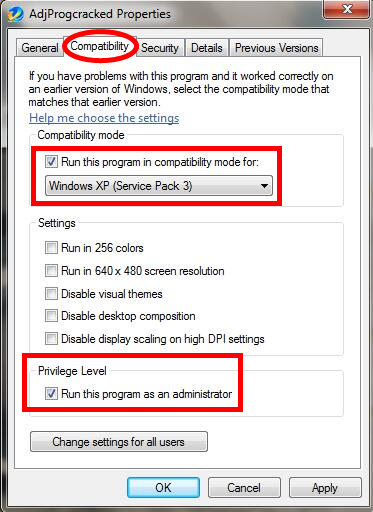
Step 3,Double-click “AdjProgcracked”,then choose “Stylus Photo R2000”

Select R2000
Step 4,Click “Particular adjustment mode”

Particular adjustment mode
Step 5,And choose “Waste ink pad counter”

Waste ink pad counter
Step 6,Click “Initialization”

Reset waste ink pad counter
Step 7,Quit the program and restart your printer, the printer will return normal again.
If you still have any doubts about our guidance, you can follow our video step by step. Or we can help you to fix this issue by teamviewer.
