
When the “Wrong Position” light is ON,then you should follow these steps to check one by one.
1, Press “Cancel” button on the printer panel & delete all pending jobs from printer task.
2, Check the AcroRIP software settings.
2.1 Set Page Margin to (Left:1cm,Top:0cm)


2.2 Set Paper Size to 21*29cm

2.3 Set Printer: Stylus Photo 1390/1400; Port: USB00X(Epson L800 Series); Check Paper Size: OFF. If you don’t make these 3 parts correct,then the printer will give errors. It won’t print anything out.

After you check step 1 & step 2,the printer will work again.
3, When you’re printing,but you find the colors are werid or not the same as you expect. You should check these.
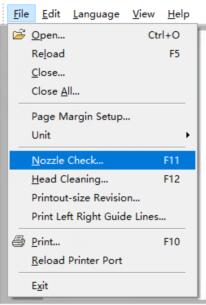
3.1 Print out nozzle check. If it’s bad,then do Head cleaning.
3.2 If nozzle check is good,then check the ink chanel & ink limit

If you’re using 6 color inks,then the Ink Chanel is YKLcLmMC. If you’re using 4 colors only,then the Ink Chanel is YKWWMC.
Regarding the ink limit,we suggest to use from 5% to 10%. The number is high,then more inks will print out on dragees.
When the printing inks on dragees can’t be dry after some time,that means the ink limit is too much,then you should reduce the ink limit.
If you still have any questions about our printing software,please kindly let us know. Thanks
